*Standin* Join the beta
In closed testing · Android first

ObserveThinkUnderstand

Keep those three.
Let Standin do the transcribing.

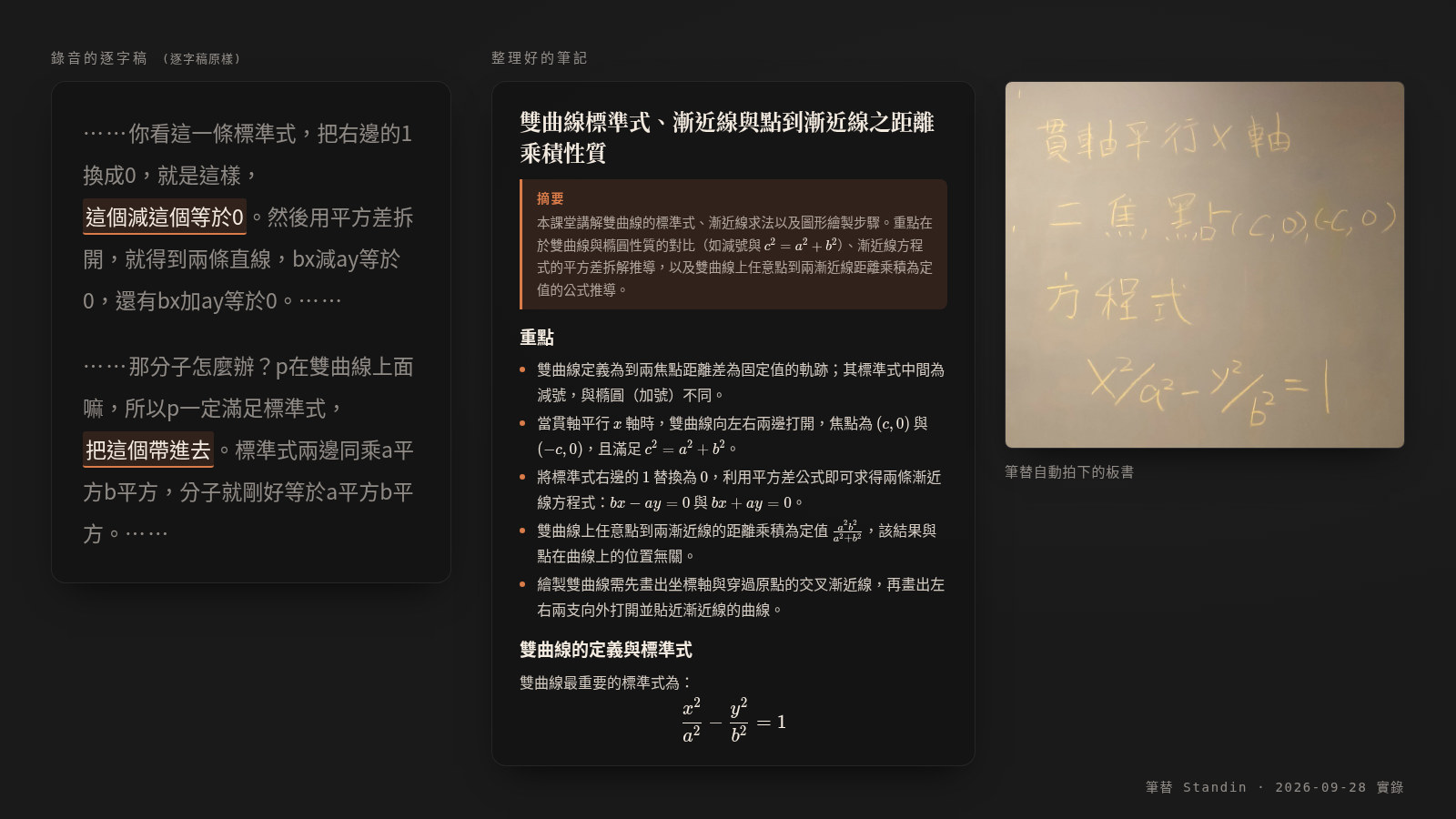
Understanding takes your full attention. Recording shouldn't have to. Standin distills a whole session's audio and photos into one clean Markdown page, waiting in your own Obsidian folder the moment it's over. Nothing passes through our servers — your data stays between you and Google.

Free to download; your first few notes are free. See your own notes before you decide to pay.

Who it's for

Wherever you're learning, it's there

Students

"Write it down and you fall behind; listen closely and your notes stay empty." Hand that trade-off over: the moment class ends, today's slides, board work, and key points are already sitting in your review folder.

At work

Training sessions, industry talks, certification courses. Everyone else walks away with a recording they'll never replay. You walk away with organized notes and the matching slides — in your own note library, searchable any time.

Self-study

Online courses, public lectures — just prop your phone up facing the screen. It photographs each slide change and transcribes the audio automatically — tap organize when you're done, and the notes appear in your folder.

Why existing tools can't record "a whole class"

Three facts, not three adjectives

Time limit
Can't transcribe past 90 minutes

Cloud transcription services at a comparable price commonly cap a single recording at 15–90 minutes. A seminar that runs long, or a three-hour lab session, loses its second half; to record the whole thing you'd need to jump to a US$240/year business plan — which still has its own monthly minute quota.

Privacy
Recordings used to train models

The leading service in this category states in its privacy policy that it uses de-identified recordings to train its models, and faced a class-action lawsuit over this in August 2025. A cloud service's recording of you has to reach its servers first.

Ownership
Cancel, and you can't take it with you

Stop the subscription, and the notes locked inside the service go with it. Standin's output is a plain Markdown file, sitting in your own folder — it's still there even if the app itself disappears.

How it works

One button, three steps

Press record

Prop the phone up on the desk. When the slide changes and settles, it photographs it automatically — only the sharpest shot of each slide is kept.

Tap organize when it's over

Transcription and organizing run on your own Google key. Measured at about US$0.121 for a 50-minute class, paid straight to Google — no markup in between.

The note lands in your folder

Title, key points, the full text by section, and the matching slide photos — plain Markdown, opens straight in Obsidian, fully searchable.

Head to head

How Standin differs from Otter, NotebookLM, Tongyi Tingwu

Standin Otter Pro NotebookLM Tongyi Tingwu
Records the class for you One button
measured single take: 1:51:09
Yes
90-minute cap per recording
No recording feature
You record it yourself and import manually
Yes
(meeting-oriented)
Auto-photographs slides Yes, on each slide change No No (you photograph and import yourself) No
Monthly quota No quota on the plans
Doesn't sell minutes — billed through your own Google account
1,200 minutes/month Free tier caps notebook count and source count Free for 90 days, then usage-based
Whose servers the recording passes through Only between you and Google
No cloud queue
Your phone talks to Google directly — no one else's line ahead of you
Otter's servers Google, stored in its own service Alibaba Cloud
Trains models on your content? We never see your content (free-tier caveat in the FAQ) Policy admits it
(de-identified)
Officially states it won't
Who owns the notes Plain Markdown, in your own folder
Directly editable
Still there if you delete the app
Locked inside the service Output stays inside its app Inside its own service
AI processing cost Your own Google key
Measured at about US$0.121/class (50 min)
Could be 0 within the free tier
Bundled in the subscription
(US$100/year)
Starts free; higher tiers tied to a Google AI subscription Usage-based billing

Competitor figures verified 2026-08-20/21 against each vendor's official pages; NotebookLM's "no recording feature" is from a third-party test in 2025-12.
AI processing cost is a 2026-08 measurement converted for a 50-minute class; the actual amount is whatever your Google account shows that day.
"Recordings are stored only on this device and cannot be recovered after the app is deleted" — verbatim, from inside a comparable app (measured 2026-08). Not uploading and files that are actually yours are two different things.

You might be wondering

Four fair questions

"I have to get my own Google key? Sounds like a hassle."

Five minutes, once. In exchange for three things: transcription costs go straight to Google, with no markup; we never touch any of your content; and if this app ever disappears, your key and your notes are still yours. The app walks you through it step by step.

"Paying for AI usage myself — how much does that actually cost?"

Your key, your bill — we don't charge per minute. Measured at about US$0.121 (roughly NT$3.9) for a 50-minute class, and Google currently still offers a free quota, so it could be 0 within that. The app has a built-in monthly spending cap — it stops you before you go over, so there's no billing surprise.

"Will the AI organizing delete the one line I need for the exam?"

Our position: save time through layering, not by deleting your content for you. Every note reads top to bottom as summary, key points, then the full text by section — read the two-minute summary when you're pressed for time, and drop down to the full text when you're unsure. If you doubt any single line, the teacher's original words are saved into your own folder by default (as a transcript attachment, which you can turn off any time in settings), and it's fully searchable — if you can find it, you don't have to replay two hours of recording.

"No cloud sync — so how do I see it on my computer?"

You already have cloud sync — it's just not something we're selling you. The notes are plain Markdown files sitting in whatever folder you chose — what tool syncs that folder to your computer is up to you, and you're probably already using one. No need to add another subscription just to sync, because it was already your file.

Pricing

Try it first, pay later

One-time purchase · don't want another subscription
US$123 one time

Pay once, use it forever. Pays for itself over the subscription past a year and a half — for people who'd rather buy a tool than rent one.

Both plans: free to download, first few notes free. See your own class turn into a note before you decide.

FAQ

Straight answers

Can I download it now?

It's in closed testing, Android first, with iOS on the roadmap. To be among the first testers, fill out the sign-up form below, we pick testers by situation and reach out directly.

Where are the recordings stored?

Recordings and photos stay on your phone; the finished notes are written into the folder you chose. We don't run a server, so there's no such thing as "your data is with us."

Is Google's free tier safe to use?

Honestly: content on the free tier may be used by Google to improve its models. That's usually fine for recording your own classes; for anything that can't leave your control, upgrade the key to the paid tier — a 50-minute class still costs only about US$0.121. The app's setup walkthrough says this again too.

How is this different from the free NotebookLM?

They divide the work differently. NotebookLM organizes files you already have, and does it well; but the hundred-plus minutes of the class itself — recording it, timing photos to the slides, importing everything — is still on you. That's exactly the part Standin handles: one button, and you have a ready Markdown note when class ends. If you want, feed the note Standin produces back into NotebookLM for deeper Q&A — the two work fine together.

What happens when I run out of AI quota?

On Google's free tier: the quota resets daily, so it's back the next day — based on measurements of the 2026-08 free-tier quota, normal use rarely hits the ceiling. If it's genuinely not enough, upgrade the key to the paid tier.

We don't recommend applying for a pile of keys just to get more quota, for two reasons. It doesn't pay off: upgrading to the paid tier is already cheap, at about US$0.121 (roughly NT$3.9) for a 50-minute class. And Google restricts API access when it detects "multiple projects being used as one" — if that trips, the tool you're actually using breaks, usually on the day you needed it most.

On Google's paid tier: billed by usage, measured at about US$0.121 for a 50-minute class, paid straight to Google with no markup in between. The app has a built-in monthly spending cap that stops you before you go over — no billing surprise.

Do I have to use Obsidian?

No. The output is just Markdown files and photos in a folder — any editor can open them. Obsidian just happens to be the one that gets the most out of it.

Does organizing notes need an internet connection?

Recording doesn't. Tapping "organize" does, because transcription and organizing run on Google Gemini — using your own key.

Join the beta

Fill this out and we'll reach out

This round, we're looking for people who genuinely have classes to take notes on this semester — it's not first-come-first-served. Filling it out doesn't guarantee an invite, but we'll get back to you as quickly as we can.